Free resume maker · No sign-up to start

Free Resume Builder: create your resume in 10 minutes

रेझ्युमे आणि बायोडाटा, मोबाईलवरच तयार करा

MahaNMK's resume maker turns your details into a professional resume PDF. Fill in your education, skills and experience once, pick a resume format that suits the job, and download. Made for job seekers across India, from private-sector jobs to Police Bharti and MPSC.

  • 4 free resume templates
  • Download resume as PDF
  • Works on any phone
  • Marathi supported

How to make a resume online in 3 steps

No design skills and no software. Our free resume generator does the formatting; you only add your details.

  1. Step 1

    Fill your details once

    Personal details, education, experience, skills and certificates. We save as you type, so you can stop and continue later.

  2. Step 2

    Choose a resume format

    Switch between resume templates any time. Your details stay the same, only the design changes.

  3. Step 3

    Download your resume PDF

    One tap. Sign in with Google to keep your resume in your account and download it again later.

One resume maker for private and government jobs

Private-sector jobs

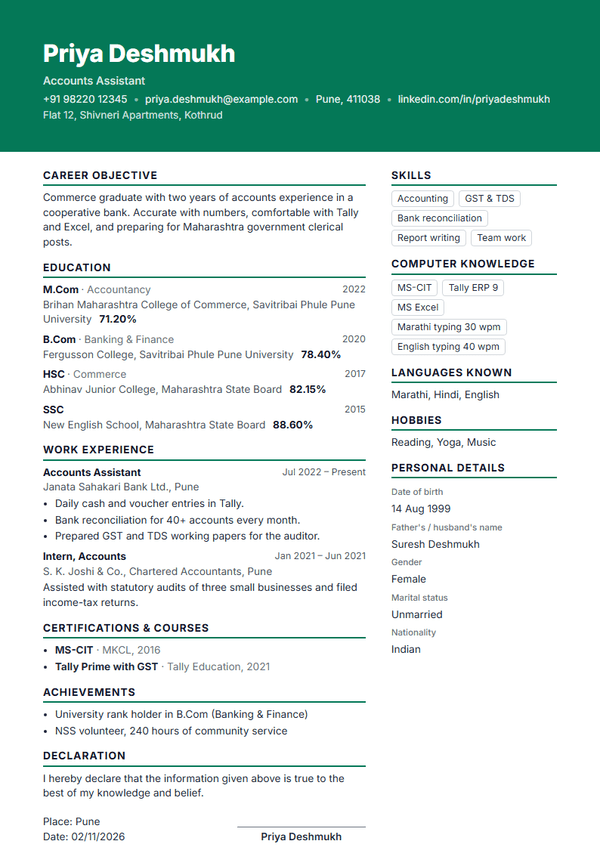
Recruiters and job portals scan a resume in seconds. Clean, ATS-friendly resume formats with clear headings, your skills near the top and measurable points under each job help you get shortlisted for banks, IT, sales, accounts and office roles.

Government jobs & biodata

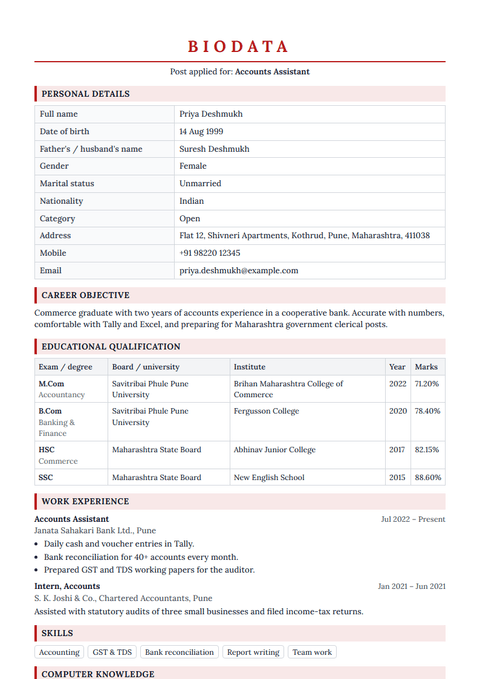
Government recruitment, contract posts and walk-in interviews often ask for a biodata: personal details in a table, educational qualification with marks, and a signed declaration with place and date. The Government Biodata template follows that layout.

The right resume format, section by section

Every template in this resume builder follows the order recruiters expect. You can hide or show any section.

  1. 1

    Header: Full name, post you are applying for, mobile number, email and city.

  2. 2

    Career objective: Two or three lines about who you are and the job you want.

  3. 3

    Education: Newest first: degree, HSC, SSC with board, year and percentage or CGPA.

  4. 4

    Work experience: Post, organisation, dates and 2–4 points about what you did. Freshers can skip it.

  5. 5

    Skills & computer knowledge: MS-CIT, typing speed, Tally, Excel and the job skills recruiters search for.

  6. 6

    Certificates & achievements: Courses, NCC/NSS, sports and awards that support your application.

  7. 7

    Personal details & declaration: Date of birth, languages, then the declaration with place, date and signature.

Resume or CV?

In India both words usually mean the same document. A resume is a short 1–2 page summary for one job; a CV can be longer and list every course and project. Use this CV maker for either: keep it to two pages for most jobs.

Resume tips that get interviews

  • Write the post you are applying for under your name.
  • Keep education newest first, with board, year and marks.
  • Add MS-CIT and typing speed: many forms ask for them.
  • Use a professional email address and a working mobile number.
  • Download a fresh PDF for each application after small edits.

MahaNMK PRO

Every template, unlimited downloads, plus everything else in PRO

One plan for your whole job search: premium resume designs, unlimited live exams, an ad-free MahaNMK and job alerts for the exams you follow.

Resume builder: questions

Is this resume builder really free?

Yes. You can create your resume, preview every template and download one PDF a day with any free template. MahaNMK PRO members download as often as they like and also get the premium templates.

How do I make a resume on my mobile?

Open the resume maker, fill in your details step by step (personal details, education, experience, skills), tap Preview to see your resume and tap Download. It works on any Android phone or iPhone; nothing to install.

Which resume format is best for freshers?

Freshers should use a one-page format that starts with a short career objective, then education with marks, skills, computer knowledge and certificates. Our Fresher and Compact templates follow exactly this order.

What is the difference between a resume and a CV?

In India both words are used for the same document. A resume is usually a short 1–2 page summary for a job; a CV can be longer and list every course, project and publication. Our builder makes a resume that works as a CV for most jobs.

Can I make a biodata for a government job?

Yes. The Government Biodata template has the table format many government forms ask for: personal details, educational qualification, declaration with place and date.

Can I write my resume in Marathi?

Yes. Any field can be typed in Marathi (Devanagari) and it prints correctly in the PDF.

Do I need an account to create my resume?

You can start without one. When you download, sign in with Google or email so your resume is saved and you can edit or download it again later.

Is my information safe?

Your resume is saved only to your account. It is never shown publicly and you can delete it any time from My resumes.